
Home
Products
Cables
CAPP Products
DIN Rail Products
Modicon Products
M580
Quantum
QASI
QRIO
QUCM
Manual
Software
Cutsheet
Applications
QSPXM
QXBP
FAQs
Compact
Momentum
Square D Products
Download Area
Price List
Application Notes
Support
NR&D Distributors
Routing & Protocol Conversion Application


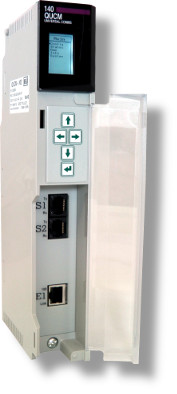

| Feature | QUCM+002 | QUCM+102 | QUCM+204 | NOE 771 01 |
|---|---|---|---|---|
| Front Panel Display | LCD/Keypad | LCD/Keypad | LCD/Keypad | LEDs |
| Ethernet Port | None | 10/100BaseT | (2) 10/100BaseT | 10/100BaseT and 100BaseFX |
| Serial Port | (2) switchable RS-232/RS-485 | (2) switchable RS-232/RS-485 | (2) switchable RS-232/RS-485, (2) fixed RS-232 | NONE |
| Config Extension Setup | YES | YES | YES | YES |
| Ethernet I/O Scanner | NO | YES | YES | YES |
| Program PLC with Modsoft, Concept, ProWORX, Unity Pro | YES (Serial) |
YES (Ethernet and/or Serial) |
YES (Ethernet and/or Serial) |
YES (Ethernet only) |
| Hot Standby Support | NO | YES (Ethernet and/or Serial) |
YES (Ethernet and/or Serial) |
YES (Ethernet only) |
| MSTR Read & Write (opcode 16) Modbus 4x Holding Registers | YES (Serial) |
YES (Ethernet and/or Serial) |
YES (Ethernet and/or Serial) |
YES (Ethernet only) |
| MSTR Write (opcode 6) Modbus 4x Holding Registers | YES (Serial) |
YES (Ethernet and/or Serial) |
YES (Ethernet and/or Serial) |
NO |
| MSTR Read & Write Enron (Daniel) Modbus (32-bit) Registers | YES (Serial) |
YES (Ethernet and/or Serial) |
YES (Ethernet and/or Serial) |
NO |
| MSTR Read Modbus 3x Input Registers | YES (Serial) |
YES (Ethernet and/or Serial) |
YES (Ethernet and/or Serial) |
NO |
| MSTR Read & Write Modbus 0x Coils | YES (Serial) |
YES (Ethernet and/or Serial) |
YES (Ethernet and/or Serial) |
NO |
| MSTR Read Modbus 1x Bits | YES (Serial) |
YES (Ethernet and/or Serial) |
YES (Ethernet and/or Serial) |
NO |
| SY/MAX 802.3 Ethernet Support | NO | YES | YES | NO |
| Web Server | NO | YES | YES | YES |
| Module configuration change without halting PLC | YES | YES | YES | NO |
The QUCM has added a number of new functions to the MSTR function of the PLC. The standard MSTR (MB+ or Ethernet) has been limited to reading and writing 4x Holding Registers in external devices. Niobrara has now added the ability to read 0x, 1x, and 3x as well as write 0x values. These new functions may be used with any Modicon programming software package.
- Read 0x Coils
- Write 0x Coils (opcode 05)
- Write 0x Coils (opcode 15)
- Read 1x Input Bits
- Read 3x Input Registers
- Write 4x Holding Registers (opcode 06)
- Read/Write Enron (Daniels) 32-bit Registers
- Priority SY/MAX Read and Write Messages
- Non-Priority SY/MAX Read and Write Messages
- Read QUCM Serial Port Configuration
- Write QUCM Serial Port Configuration
- Reset QUCM to Factory Defaults
- Set QUCM IP Address
- Set QUCM IP Subnet Mask
- Set QUCM IP Default Gate
Ethernet has been the network of choice for information for some time now. Its widespread use has made it very affordable and readily available. The information technology departments of many companies already have in place an Ethernet infrastructure that includes cabling, repeaters and hubs, as well as network management and support. The QUCM is ideal for companies that require information from their Modbus devices and who would like to leverage their existing Ethernet infrastructure. Information from these devices is readily available to the entire enterprise since any Ethernet device with a Modbus/TCP driver can access or control Modbus devices with the help of the QUCM.
Serial master devices can communicate with serial slave devices that are too far away to be reached through serial cabling. The plant-wide Ethernet can be used to carry communication between these devices.
An additional benefit of serial devices connected via Ethernet is that multiple master devices can have access to every slave device. This is beyond the capabilities of most serial communication networks and their protocols.
The QUCM allows master devices to use its serial ports as gateways to the high-speed network. A serial Modbus-master device, such as an HMI, building automation system, SCADA package or programming terminal, connected to a QUCM port can access devices on the Ethernet network and/or the PLC itself. A user with a laptop can connect to a QUCM serial port to program the local PLC or Modicon PLCs anywhere on the Ethernet network.
Messages from a device on one serial port can be routed to devices on the other serial port. If the protocols are different, the QUCM acts as a protocol converter, allowing devices with different protocols to talk to each other. The QUCM can transfer data between slave devices on the two serial ports using its mailbox registers and the Autoscan feature. Serial ports are switchable to either RS-232 or RS-422/485 mode.
The Ethernet port of the QUCM can be configured to speak the SY/MAX 802.3 protocol as well as Modbus/TCP. SY/MAX 802.3 is the protocol used by the SY/MAX 450 and 650 processors and DEC VAX computers running SFW-390. With this protocol, the QUCM can be used to create a SY/MAX serial to SY/MAX Ethernet bridge. All of the configuration, statistic and mailbox registers appear as processor equivalent registers to SY/MAX devices.
The QUCM may be used as a replacement for the discontinued 140NOE311 SY/MAX NOE. Additionally, the QUCM configured for SY/MAX 802.3 protocol will accept messages with more than 3 drops, so it will support SFW-390 software and messages from devices other than 450 and 650 processors, such as other bridge devices.
The QUCM allows a serial port to act as both a Modbus and RNIM master simultaneously. This is useful for adding Modbus devices to previously existing RNIM radio networks.
The Ethernet port of the QUCM has an RJ-45 jack for 10BaseT Ethernet media. Conversion to other media, such as ThinWire or fiber optic cable requires the use of an external media converter or a connection on an Ethernet hub. Both of these items are widely available.
| The QUCM enables any of these devices: | To Access Any: | Over These Media: |
| Modbus/TCP initiators: | Modbus/TCP devices: | Twisted Pair Ethernet |
| TSX Quantum PLC with Ethernet NOM | TSX Quantum Ethernet NOM | |
| Momentum Ethernet processor | Momentum Ethernet processor | Other Ethernet† |
| QUCM | Momentum I/O with Ethernet comm adapter | Radio† |
| MEB-TCP | QUCM | Telephone† |
| EPE5-TCP-D and EPE5-TCP-A | EPE5-TCP-D and EPE5-TCP-A | SY/NET† |
| Concept programming software version 2.1 | PEN-TCP and PEN-TCP-SA | Fiber Optic† |
| Modsoft programming software version 2.5 | ECM-2000 and ECM-RM | Token Ring† |
| Taylor's ProWORX NxT software | ||
| POWERLOGIC’s SMS 3000 and 1500 | Serial devices: | |
| HMI or Operator Interface with Modbus/TCP driver | ||
| NR&D 32-bit configuration software | TSX Quantum PLC | |
| Compact 984 PLC | ||
| Serial port initiators: | Micro PLC | |
| Momentum PLC | ||
| TSX Quantum with XMIT loadable | Momentum I/O with serial comm adapter | |
| Compact 984 with XMIT loadable | Modbus RTU slave device | |
| Micro with XMIT loadable | Modbus ASCII slave device | |
| Momentum with XMIT loadable | Altivar Drive with Modbus | |
| QUCM-S, QUCM | Altivar Drive with SY/MAX | |
| MEB all versions | QUCM-S | |
| EPE5 all versions | MEB all versions | |
| SPE4 all versions | EPE5 all versions | |
| UCM all versions | SPE4 all versions | |
| Modbus RTU Master device | UCM all versions | |
| Modbus ASCII Master device | CAT2 | |
| SY/MAX PLC | STU2 and STU4 | |
| SY/MAX device | SY/MAX PLC | |
| RNIM master device | SY/MAX NIM | |
| PNIM master device | SY/MAX device | |
| Concept programming software | POWERLOGIC Circuit Monitor | |
| Modsoft programming software | POWERLOGIC Power Meter | |
| Taylor programming software | PowerLink panel | |
| POWERLOGIC SMS 3000, 1500, 770, etc. | RNIM slave device | |
| HMI or Operator Interface w/ Modbus or SY/MAX | PNIM slave device | |
| SCADA package with Modbus or SY/MAX driver | Micro-1 | |
| Building Automation package w/ Modbus or SY/MAX driver | Model 50 | †requires additional equipment |
There are three kinds of internal registers: mailbox registers, configuration registers and statistic registers. All of the registers appear as 4x registers to Modicon devices and they are available from any port on the QUCM. The first 2048 registers are user-defined mailbox registers. The Quantum PLC can I/O map up to 32 input registers and 32 output registers when the QUCM is used in a local, remote or distributed rack (maximum of 30 input registers in a distributed rack). When Master devices need to exchange information, each can write data into the mailbox registers for the other to read.
QRPC is easially configured through the built-in web server. Also supplied with the QUCM is PC software that allows configuration of the unit through any communication path between the PC and the QUCM; these configurations can then be saved to disk. The software can make use of a serial or Ethernet connection. The QUCM's firmware is stored in Flash memory and can be updated through a serial port. The QUCM comes with one-year free firmware upgrades, a one-year warranty, a user manual and configuration software on a CD.
The QUCM+102 is the replacement for the QUCM-OE. The QUCM-002 also replaces the QUCM-O.
SPECIFICATIONS:
Dimensions: Standard Quantum register module. 1.59" wide by 9.84" tall by 4.09" deep (40 x 250 x104 mm). Approximately 12 oz. (340 g.) net. All connectors and indicators are front mounted except the Quantum bus card edge connector on the back.
Power Requirements: From Quantum bus; 5 VDC, 550 mA max (350 mA typical).
Operating Conditions: 0 to 50 degrees C; humidity up to 90% noncondensing; pressure altitude -200 to +10,000 feet MSL.
Serial Ports: Two data I/O ports. 50, 75, 110, 134.5, 150, 300, 600, 1200, 1800, 2400, 4800, 7200, 9600, or 19,200 baud. 7 or 8 data bits; odd, even or no parity; 1 or 2 stop bits. Switchable from RS-232 to RS-422/485 (2-wire or 4-wire). RJ-45 female connectors, Modicon Micro pinout.
Serial Port Modes: Each I/O port can independently operate in any of the following modes: Modbus RTU (Host or Gate); Modbus ASCII (Master or Slave); SY/MAX; Net-to-Net; PNIM; RNIM (Master or Slave); PLogic; Chevron; Peripheral; Multidrop; IDEC; Gateway; Transparent; Share; Transfer.
Ethernet Port: 100BaseT, RJ-45 connector. Modbus/TCP and SY/MAX 802.3 compatible. E-Peer compatible, Web Server for configuration.
Display: LCD display with 5 button keypad for front panel configuration.
Indicators: LED indicators for Serial Port Transmit, Receive, Ethernet Link and 100MB.
Mailbox Registers: 2,048 4x register and 32 3x registers. Non-volatile. PLC can map up to 32 input and 32 output registers in local or remote I/O racks and up to 30 in, 32 out in distributed I/O racks.
Setup Registers: 4x registers accessible through any port; stored in non-volatile RAM and Flash.
ORDERING INFORMATION
The QUCM is available as:
QUCM+002 with 2 switchable RS232/RS485 ports
QUCM+102 with 2 switchable RS232/RS485 ports, 1 100BaseT Ethernet port
QUCM+204 with 2 switchable RS232/RS485 ports, 2 fixed RS-232 ports, 2 100BaseT Ethernet ports
QUCM Accessories:
| MM1 | RS232 cable for configuring the QUCM. |
| DDC2I | Optically isolated RS232<>RS485 converter, DIN rail mount. |
| BB85 | DIN rail mount RS485 screw terminal. |
| QXBP | Single slot rack with built in power supply for stand alone installations. |